# Blog 集成 Algolia DocSearch
我们在浏览技术网站的时候,发现现在很多的技术网站(比如:Vue、React、Vite)都使用了 Algolia DocSearch (opens new window) 对他们提供的内容进行搜索。今天我打算在本博客网站上也集成 Algolia DocSearch,以便对博客内容进行更好的搜索(以前只能搜索文章标题)。
本博客于 2019年使用 VuePress v1 (opens new window) + 博客主题 (opens new window) 搭建的。因为该 博客主题 (opens new window) 一直没有升级以支持 VuePress v2 以及之后的 VitePress (opens new window),而我也非常喜欢该主题的风格,因此也没有升级到 VuePress v2。以后打算改用 VitePress (opens new window) 或者 Astro (opens new window)。
通过查看 Algolia DocSearch (opens new window) 的 GitHub 文档,我原以为只需 1~2 个小时就能集成 Algolia DocSearch,结果花了我一整个周末才搞定。实现的过程中也踩了不少的坑,因此想通过这篇文章记录下来。
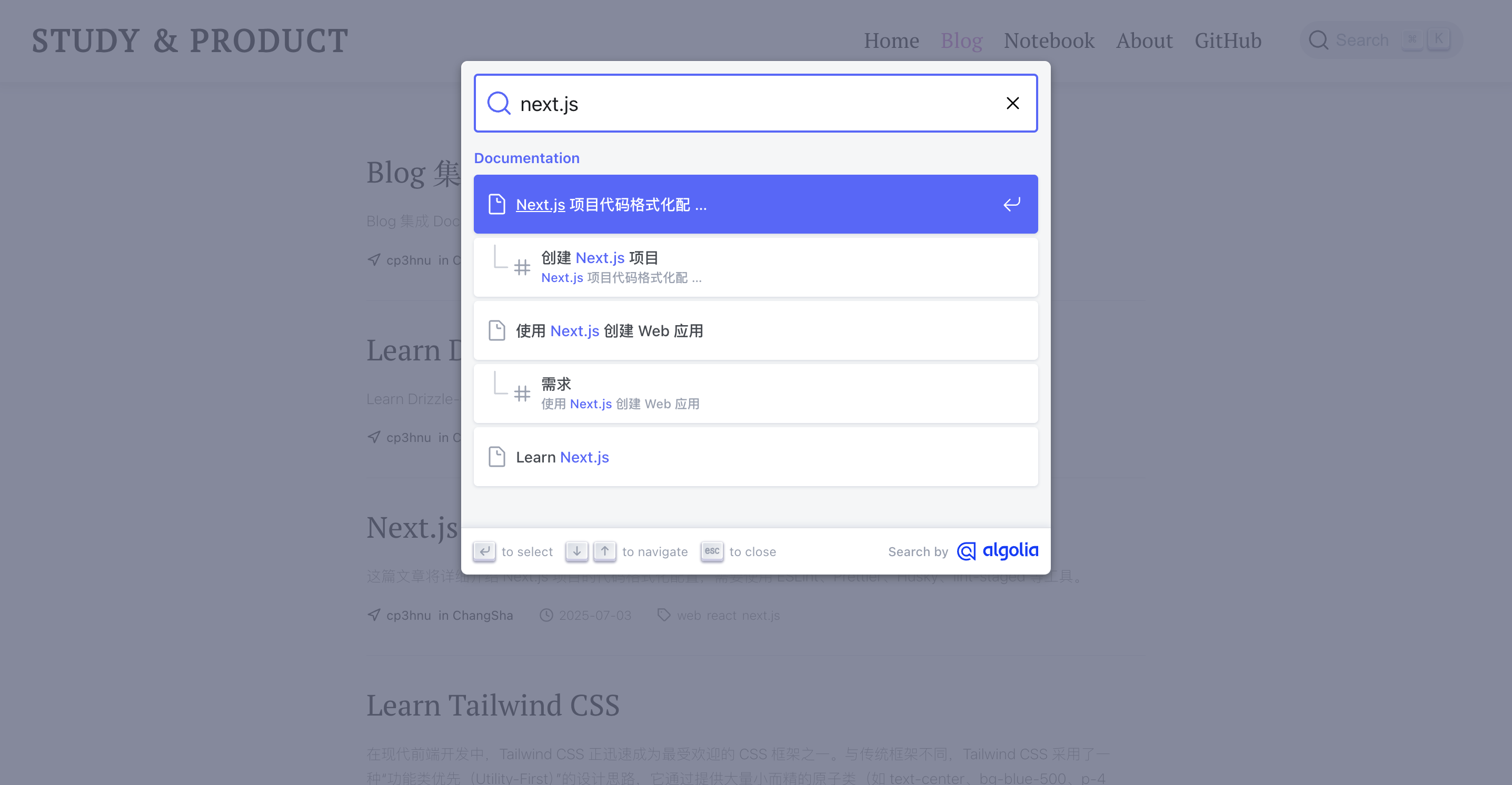
实现的最终效果如下:
# 接入 DocSearch
VuePress v1 的默认主题 (opens new window) 已经集成了 Algolia DocSearch,但是 博客主题 (opens new window) 不支持,需要自己手动配置。
根据 Algolia DocSearch (opens new window) 的 GitHub 文档,接入 DocSearch 很简单
- 安装 DocSearch
$ npm install @docsearch/js@3
- 创建 Algolia DocSearch 项目 (opens new window)
- 添加 DocSearch 挂载的容器
<div id="docsearch"></div>
- 在项目入口添加一段脚本
import docsearch from '@docsearch/js';

import '@docsearch/css';

docsearch({
  container: '#docsearch',
  appId: 'YOUR_APP_ID',
  indexName: 'YOUR_INDEX_NAME',
  apiKey: 'YOUR_SEARCH_API_KEY',
});
2
3
4
5
6
7
8
9
10
appId 和 apiKey 在刚才创建的 Algolia DocSearch 项目中可以找到
container 就是 DocSearch 挂载的容器,支持 CSS 选择器或者Element 元素。
indexName 是什么?文档中没有说明,即便是 DocSearch 官方文档 (opens new window)也只有简单的描述
Your Algolia index name.
先不管了,空着。
回到我们的博客,界面上已经有了 DocSearch。但是搜索没有数据。

# Crawler
# indexName
没有查询到数据的根源就在于没有设置 indexName 参数。那 indexName 参数究竟代表什么?
其实 indexName 就是你的网站内容索引数据库。就像后台 API 需要从数据库里获取数据一样,DocSearch 也是需要从索引数据库里检索数据。那这个数据库从何而来?DocSearch 通过 Crawler 抓取您的网页内容,生成索引数据库。
# 创建 Crawler
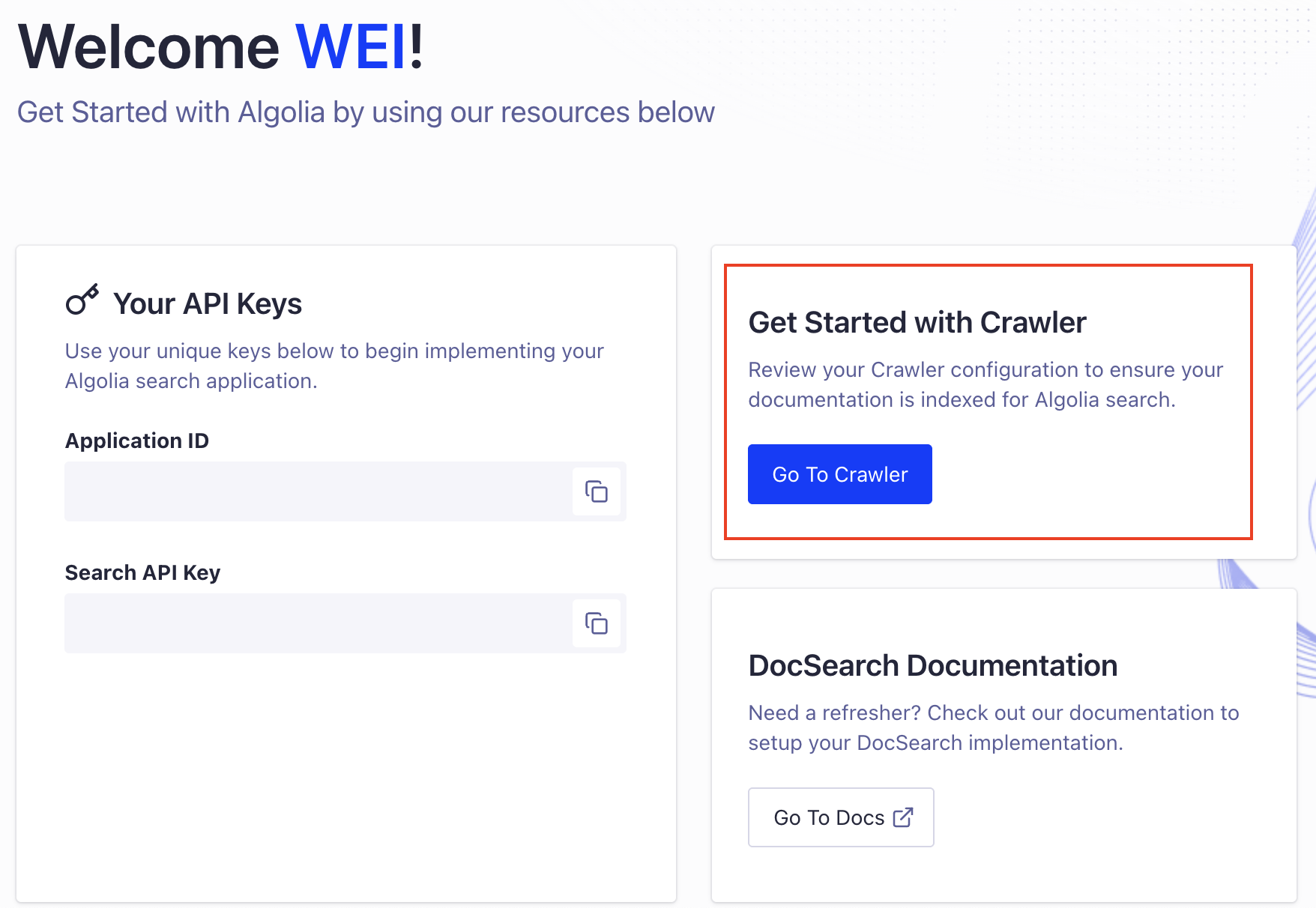
去到项目的工作台 (opens new window),点击 "Go To Crawler",创建一个 Crawler
首先添加您网站的域名,并进行认证(需要证明是您的网站),Algolia 提供了四种认证方式:
Meta TagHTML fileRobots.txtDNS
如果我们能控制源代码,最简单的方式是使用 Meta Tag。
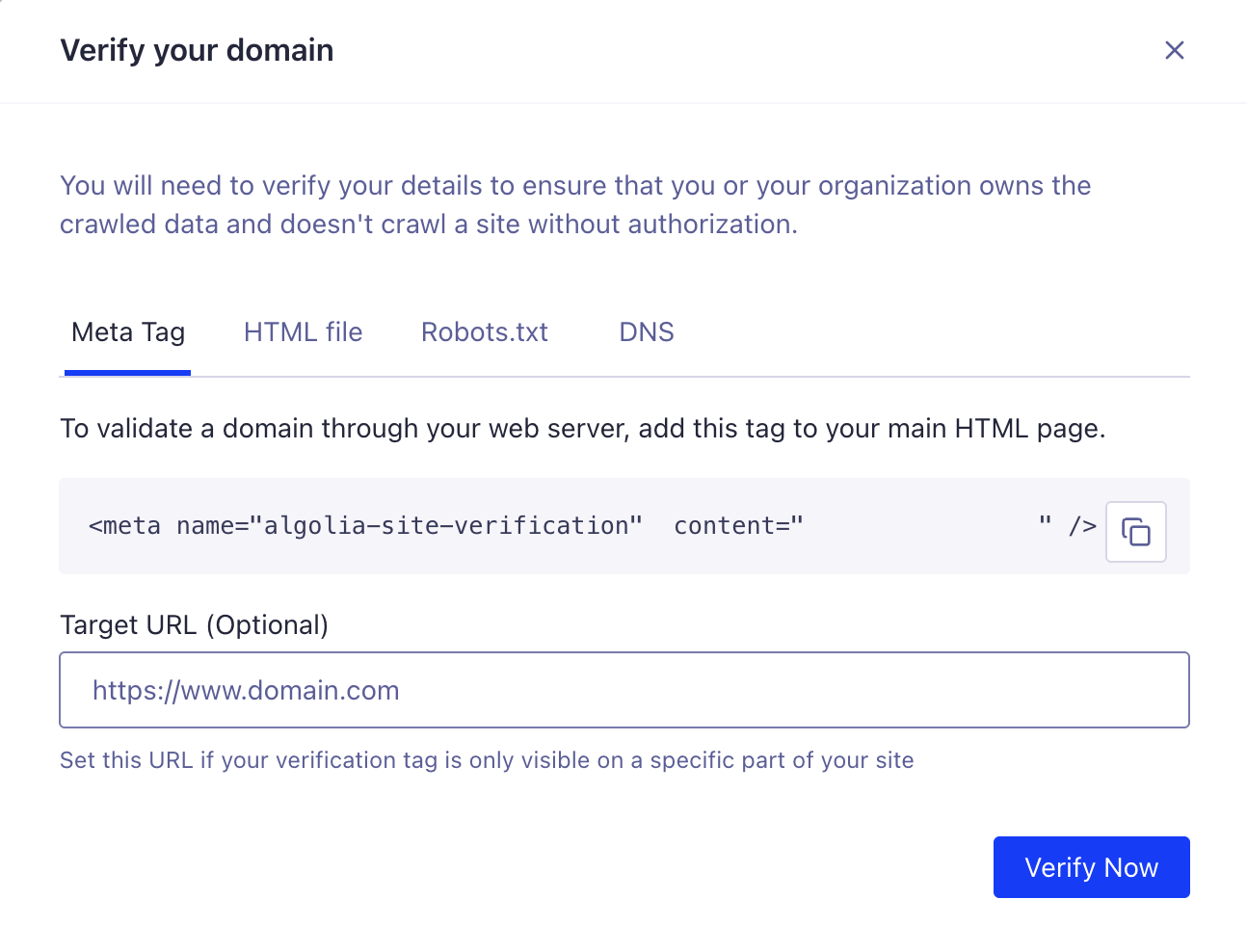
添加上面的代码到 HMTL Head 标签下,点击 "Verify Now"。当认证通过后,就可以创建 Crawler。
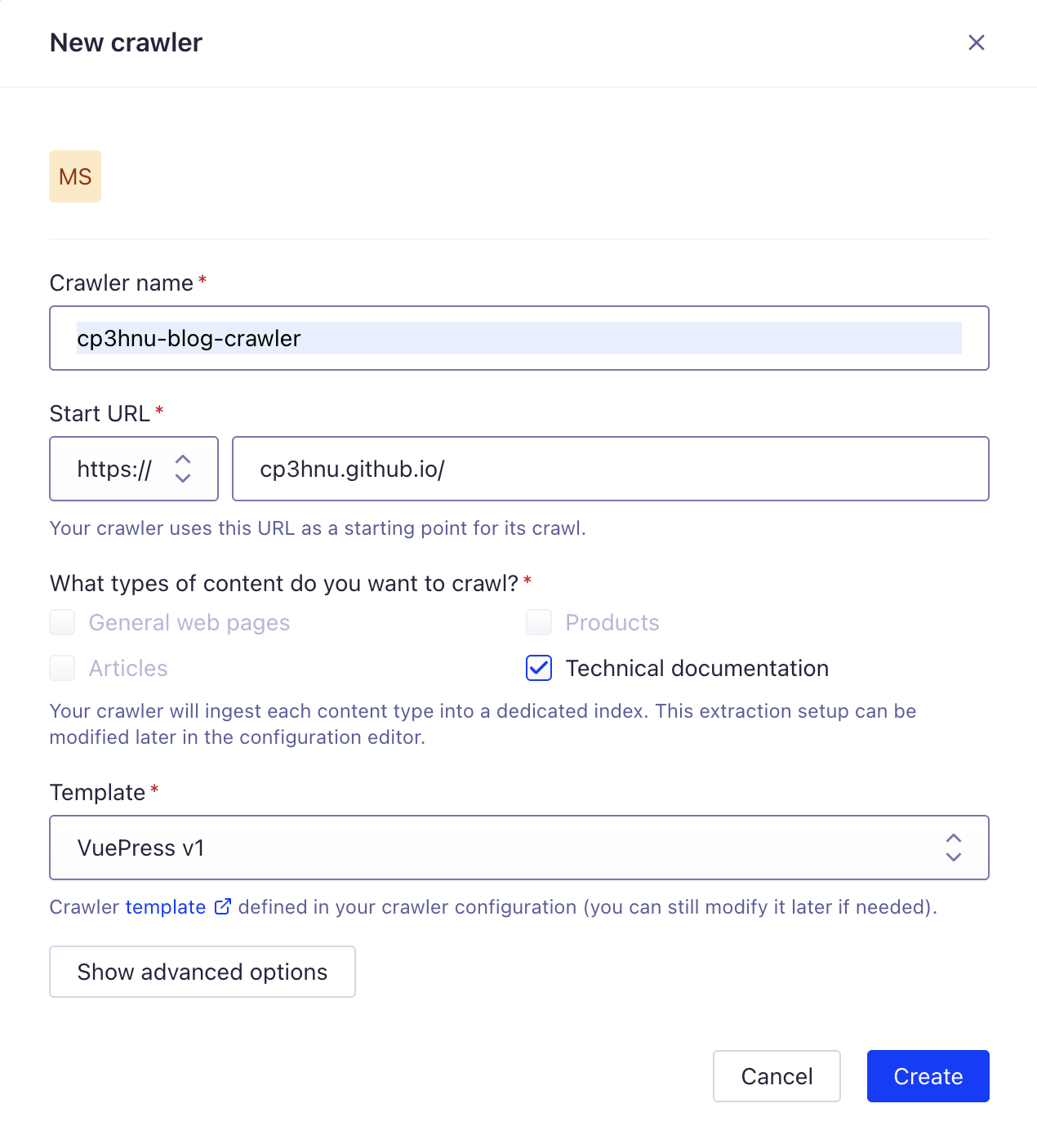
输入 Crawler name 和 Start URL,然后选择网页内容类型,这里我选择 "Technical documentation"。对于这个类型,DocSearch 提供了几种 模版 (opens new window) 可供选择,我选择 "VuePress v1" 。如果选错了,也没有关系,后面还可以手动修改 Crawler 的配置。
创建好了之后,他会运行测试 crawl,测试 crawl 最多访问 100 个 URL。运行成功后您可以看到一个统计页面(访问了多少了页面,生成了多少个记录),并且生成了一个 index。
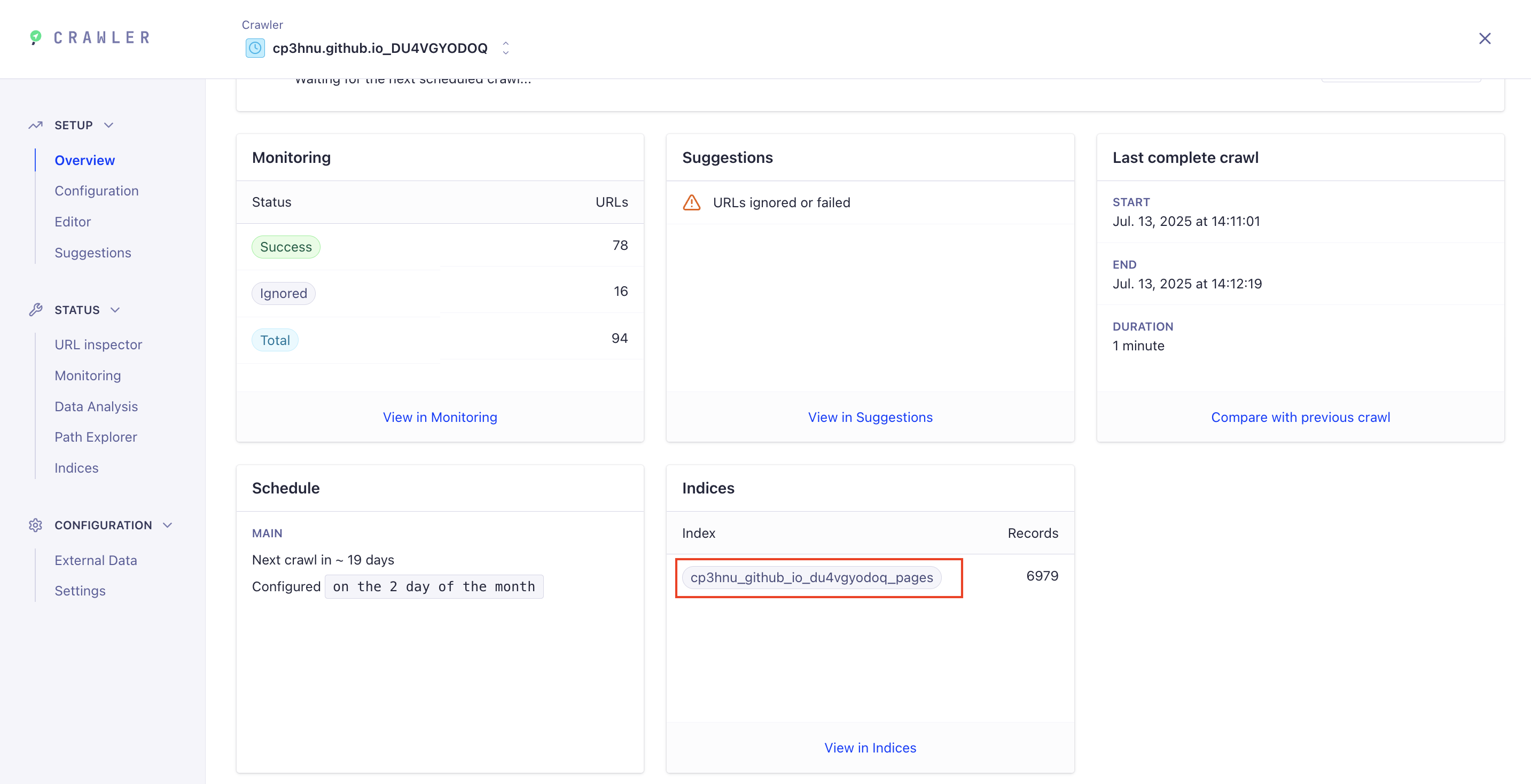
这个就是要填写的 indexName 参数。
将这个值填写到 JS 代码里,运行程序,就能搜索到内容了。
如果没有搜索到结果,并且控制台报错:
Uncaught (in promise) TypeError: Cannot read properties of undefined (reading 'lvl0')
出错是因为索引(Index)数据库里的数据没有返回 hierarchy 字段,导致读取 hierarchy.lvl0 时报错。原因可能是在创建 Crawrler 时,网页内容类型(What types of content do you want to crawl?)选择了 "General web pages",或者选错了模版。不要慌,我们还可以手动修改 Crawler 配置。
# 手动配置 Crawler
进入 Crawler 页面,选择 "Configuration" 进行可视化配置,或者选择 "Editor" 进行代码配置。我们直接选择代码配置,他的功能更全。复制 Vuepress v1 Template (opens new window) 的配置到 Editor。
new Crawler({
  appId: 'YOUR_APP_ID',
  apiKey: 'YOUR_API_KEY',
  rateLimit: 8,
  maxDepth: 10,
  schedule: "on the 2 day of the month",
  startUrls: ['https://cp3hnu.github.io/'],
  sitemaps: ['https://YOUR_WEBSITE_URL/sitemap.xml'],
  discoveryPatterns: ['https://YOUR_WEBSITE_URL/**'],
  actions: [
    {
      indexName: 'cp3hnu_github_io_du4vgyodoq_pages',
      pathsToMatch: ['https://cp3hnu.github.io/**'],
      recordExtractor: ({ $, helpers }) => {
        return helpers.docsearch({
          recordProps: {
            lvl0: {
              selectors: 'p.sidebar-heading.open',
              defaultValue: 'Documentation',
            },
            lvl1: '.content__default h1',
            lvl2: '.content__default h2',
            lvl3: '.content__default h3',
            lvl4: '.content__default h4',
            lvl5: '.content__default h5',
            content: '.content__default p, .content__default li',
          },
          indexHeadings: true,
          aggregateContent: true,
        });
      },
    },
  ],
  initialIndexSettings: {
    cp3hnu_github_io_du4vgyodoq_pages: {
      attributesForFaceting: ['type', 'lang'],
      attributesToRetrieve: ['hierarchy', 'content', 'anchor', 'url'],
      attributesToHighlight: ['hierarchy', 'hierarchy_camel', 'content'],
      attributesToSnippet: ['content:10'],
      camelCaseAttributes: ['hierarchy', 'hierarchy_radio', 'content'],
      searchableAttributes: [
        'unordered(hierarchy_radio_camel.lvl0)',
        'unordered(hierarchy_radio.lvl0)',
        'unordered(hierarchy_radio_camel.lvl1)',
        'unordered(hierarchy_radio.lvl1)',
        'unordered(hierarchy_radio_camel.lvl2)',
        'unordered(hierarchy_radio.lvl2)',
        'unordered(hierarchy_radio_camel.lvl3)',
        'unordered(hierarchy_radio.lvl3)',
        'unordered(hierarchy_radio_camel.lvl4)',
        'unordered(hierarchy_radio.lvl4)',
        'unordered(hierarchy_radio_camel.lvl5)',
        'unordered(hierarchy_radio.lvl5)',
        'unordered(hierarchy_radio_camel.lvl6)',
        'unordered(hierarchy_radio.lvl6)',
        'unordered(hierarchy_camel.lvl0)',
        'unordered(hierarchy.lvl0)',
        'unordered(hierarchy_camel.lvl1)',
        'unordered(hierarchy.lvl1)',
        'unordered(hierarchy_camel.lvl2)',
        'unordered(hierarchy.lvl2)',
        'unordered(hierarchy_camel.lvl3)',
        'unordered(hierarchy.lvl3)',
        'unordered(hierarchy_camel.lvl4)',
        'unordered(hierarchy.lvl4)',
        'unordered(hierarchy_camel.lvl5)',
        'unordered(hierarchy.lvl5)',
        'unordered(hierarchy_camel.lvl6)',
        'unordered(hierarchy.lvl6)',
        'content',
      ],
      distinct: true,
      attributeForDistinct: 'url',
      customRanking: [
        'desc(weight.pageRank)',
        'desc(weight.level)',
        'asc(weight.position)',
      ],
      ranking: [
        'words',
        'filters',
        'typo',
        'attribute',
        'proximity',
        'exact',
        'custom',
      ],
      highlightPreTag: '<span class="algolia-docsearch-suggestion--highlight">',
      highlightPostTag: '</span>',
      minWordSizefor1Typo: 3,
      minWordSizefor2Typos: 7,
      allowTyposOnNumericTokens: false,
      minProximity: 1,
      ignorePlurals: true,
      advancedSyntax: true,
      attributeCriteriaComputedByMinProximity: true,
      removeWordsIfNoResults: 'allOptional',
    },
  },
});
2
3
4
5
6
7
8
9
10
11
12
13
14
15
16
17
18
19
20
21
22
23
24
25
26
27
28
29
30
31
32
33
34
35
36
37
38
39
40
41
42
43
44
45
46
47
48
49
50
51
52
53
54
55
56
57
58
59
60
61
62
63
64
65
66
67
68
69
70
71
72
73
74
75
76
77
78
79
80
81
82
83
84
85
86
87
88
89
90
91
92
93
94
95
96
97
98
99
100
然后重新运行 "Crawling",抓取 Blog 内容,生成新的索引数据库。再去搜索,这个时候应该就可以搜索到内容了。
# Crawler 的配置项
下面介绍一下 Crawler 的配置项。Crawler 的配置项比较多,完整列表请参考 Crawler Configuration (opens new window)。这里讲解几个比较重要的。
# startUrls
Crawler 的入口 URLs,一般设置为您网站的域名。
# discoveryPatterns
指示 Crawler 应该访问哪些网页,支持 micromatch (opens new window)。Crawler 会提取这些页面链接的页面,但不会从这些中间页面提取记录时。比如博客列表页面:https://cp3hnu.github.io/blog/page/xx。
# exclusionPatterns
告诉 Crawler 要忽略或排除哪些 URL。支持 micromatch (opens new window)。后面有用到。
# sitemaps
在 sitemaps 中找到的 URL 被视为 Crawler 的起始点。后面有用到。
# actions
确定哪些网页以何种方式转换成 Algolia 记录。这是一个对象数组,也包含很多参数 (opens new window),常用的有下面三个参数:
# indexName
操作对应的 Index(索引数据库)的名称
# pathsToMatch
操作应该处理哪些网页。支持 micromatch (opens new window)。
# recordExtractor
一个自定义 Javascript 函数,他从页面中提取所需的内容,生成 Algolia 记录,存于索引数据库里。这个函数返回 JSON 对象数组或空数组,如果是一个空数组,表示跳过该页。
Algolia 提供了多个内置的函数帮助我们快速集成,可以通过 recordExtractor 的 helpers 参数访问 。helpers.docsearch 内置函数用于 DocSearch 集成,他提取文档的 H0~H5 标题以及文档内容,生成 Algolia 记录。
这里的关键就是,为了让 helpers.docsearch 知道哪些是 H0~H5 标题以及文档内容,需要指定 lvl0 ~ lvl5 以及 content 对应的 CSS 选择器。对于 VuePress v1,他的配置应该是这样的:
{
  lvl0: {
    selectors: 'p.sidebar-heading.open',
    defaultValue: 'Documentation',
  },
  lvl1: '.content__default h1',
  lvl2: '.content__default h2',
  lvl3: '.content__default h3',
  lvl4: '.content__default h4',
  lvl5: '.content__default h5',
  content: '.content__default p, .content__default li',
}
2
3
4
5
6
7
8
9
10
11
12
关于 helpers.docsearch 函数的更多详情,请参考 Record Extractor (opens new window)。
# initialIndexSettings
Crawler 索引数据库的配置,参数更多,完整列表请参考 Crawler Index Settings Parameters (opens new window)。
# attributesToRetrieve
attributesToRetrieve (opens new window) 参数控制抓取哪些属性,不抓取哪些属性。
{
  attributesToRetrieve: ['hierarchy', 'content', 'anchor', 'url']
}
2
3
hierarchy 关键,之前的错误
Uncaught (in promise) TypeError: Cannot read properties of undefined (reading 'lvl0')
就是因为没有抓取到 hierarchy 值,导致读取 hierarchy.lv10 值时报错。
# searchableAttributes
searchableAttributes (opens new window) 参数控制搜索时匹配哪些属性。数量越少,检索速度越快。越排在前面的属性优先级越高。DocSearch 提供的 VuePress v1 的模板有很多的属性,hierarchy_radio、hierarchy_radio_camel、hierarchy_camel 好像没什么用,文档里也找不到它们的定义,因此我简化为
{
   searchableAttributes: [
    "unordered(hierarchy.lvl0)",
    "unordered(hierarchy.lvl1)",
    "unordered(hierarchy.lvl2)",
    "unordered(hierarchy.lvl3)",
    "unordered(hierarchy.lvl4)",
    "unordered(hierarchy.lvl5)",
    "unordered(hierarchy.lvl6)",
    "content",
  ],
}
2
3
4
5
6
7
8
9
10
11
12
unordered 是一个 Modifiers (opens new window)。忽略属性中匹配的位置。默认情况,从属性开头的匹配优先级更高。设置 unordered 使所有匹配优先级相等,不管匹配的位置。
# attributesToHighlight
attributesToHighlight (opens new window) 控制哪些属性要高亮显示。使用 highlightPreTag 和 highlightPostTag 元素进行包裹。
{
  attributesToHighlight: ["hierarchy", "content"],
}
2
3
# camelCaseAttributes
camelCaseAttributes (opens new window) 参数控制拆分哪些驼峰格式属性为多个单词,比如 camelCaseAttributes 可以分成 3 个单词,camel、case、attributes, 这个一般用于英语环境中。
camelCaseAttributes: ["hierarchy", "content"],
# attributeForDistinct 和 distinct
attributeForDistinct (opens new window) 和 distinct (opens new window) 两个参数控制分组的属性名称。
所有具有相同 attributeForDistinct 值的记录都被视为一个组。一般设置为 url
distinct 确定搜索结果中每组可以包含多少个变体(variant)。
{
   attributeForDistinct: "url",
   distinct: true,
}
2
3
4
# ranking
ranking (opens new window) 参数确定排序方式。一般保留默认的排序即可。
排序策略请参考 Ranking criteria (opens new window) 和 The eight ranking criteria (opens new window)。
{
  ranking: [
    "words",
    "filters",
    "typo",
    "attribute",
    "proximity",
    "exact",
    "custom",
 ],
}
2
3
4
5
6
7
8
9
10
11
# customRanking
customRanking (opens new window) 参数确定自定义排名属性。
{
  customRanking: [
    "desc(weight.pageRank)",
    "desc(weight.level)",
    "asc(weight.position)",
  ]
}
2
3
4
5
6
7
# typoTolerance
typoTolerance (opens new window) 参数控制是否允许错别字。
# 验证
# 验证 Crawler 配置
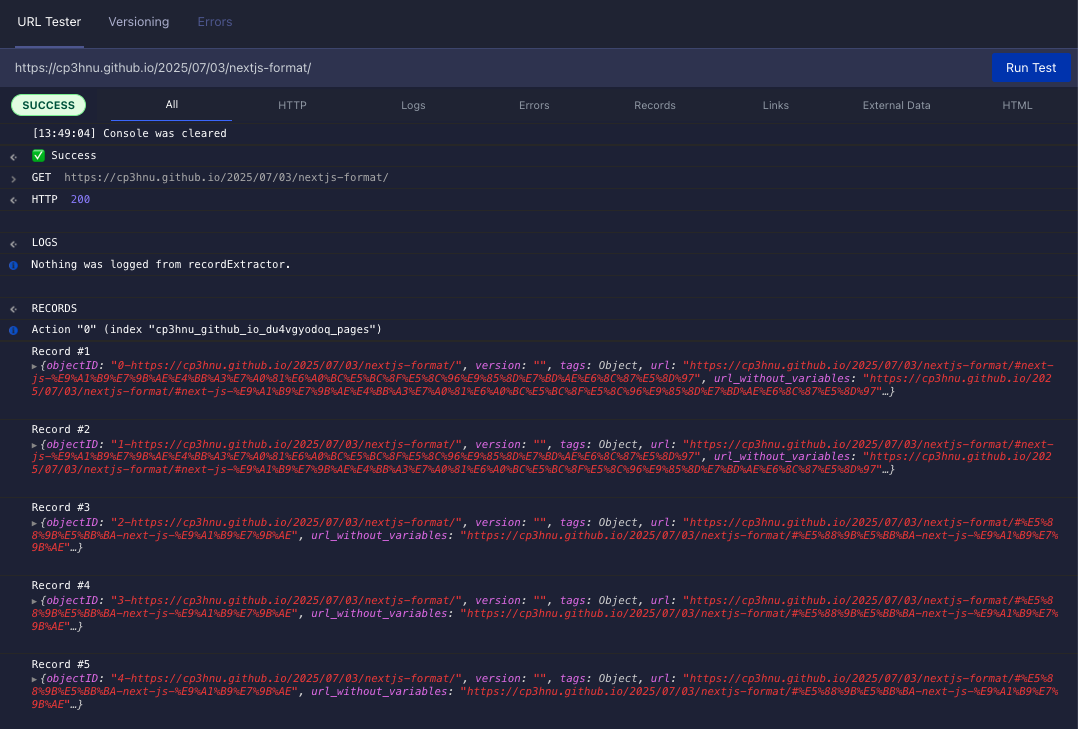
可以在 Crawler 的 "Editor" 页面验证 Crawler 配置
# 验证 DocSearch 搜索
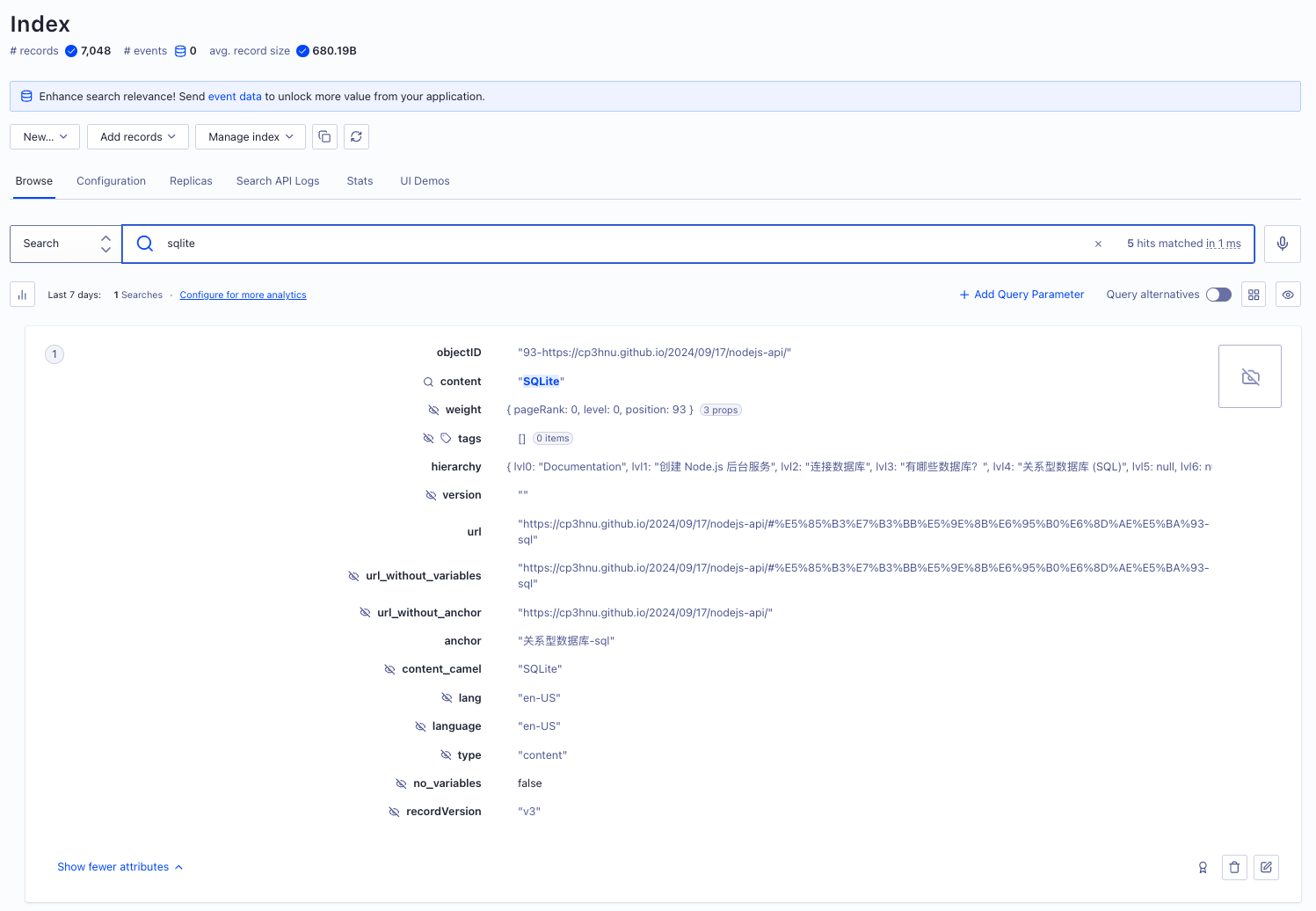
可以在 Index 页面进行搜索验证
# 创建 Sitemaps
通过上一步配置 Crawler,现在搜索时不会报错了,而且可以搜索到内容了,但是在我使用的过程中发现,有些页面的内容搜索不到,通过查看 Crawler 的 Monitoring tool 或者 URL inspector 发现有些页面并没有被抓取。
原因是 VuePress 是根据 Markdown 文件自动生成 URL,Algolia Crawler 可能不知道(或者会漏掉)某些 URL。
一个解决办法是,手动将漏掉的 URL 添加到 extraUrls (opens new window)。
{
  extraUrls: ['https://cp3hnu.github.io/2024/08/23/node-cli/'],
}
2
3
如果漏掉的 URL 很多,一个一个添加太麻烦了。更好的方式是使用 Sitemaps。
Sitemaps 是网站管理员告知搜索引擎,网站有哪些页面可以抓取。Crawler 也使用 Sitemaps 抓取页面内容。
VuePress v1 可以使用 vuepress-plugin-sitemap (opens new window) 插件帮我们创建 Sitemaps。
首先安装 vuepress-plugin-sitemap
$ npm i -D vuepress-plugin-sitemap
然后添加配置
plugins: [
  [
    'sitemap',
    {
      hostname: 'https://cp3hnu.github.io', // ✅ 你的站点地址
    }
  ],
]
2
3
4
5
6
7
8
编译就会生成 sitemap.xml 文件,然后我们修改 Crawler 配置。
new Crawler({
  sitemaps: ['https://cp3hnu.github.io/sitemap.xml'],
}
2
3
点击 "Start Crawling" 重新抓取,此时网站上所有的页面内容都被抓取到了。
# 排除 URL
如果网站上有些内容不想被抓取,有哪些方法呢?我通过熟读 Algolia Crawler (opens new window) 文档,总结出三种方法,由粗到细:
# exclusionPatterns
最简单的方式是使用 exclusionPatterns (opens new window) 配置,全局排除 URL,支持 micromatch (opens new window)。比如我不想 https://cp3hnu.github.io/tag/ 下的网页内容被抓取,可以这么设置:
exclusionPatterns: [
  'https://cp3hnu.github.io/tag/**'
]
2
3
# actions.pathsToMatch
如果只是想排除某个 Action 抓取某些页面的内容,可以使用 actions.pathsToMatch,也支持 micromatch (opens new window),但是需要是使用 negation 标识(!)。比如某些页面的数据格式跟您的 blog 页面的数据格式不同,就可以把这些页面排除出 blog 索引数据库。
actions: [
  {
    indexName: 'cp3hnu_github_io_du4vgyodoq_pages',
    pathsToMatch: ['https://cp3hnu.github.io/**', '!https://cp3hnu.github.io/product/**']
  },
]
2
3
4
5
6
# actions.recordExtractor
如果 actions.recordExtractor 返回一个空数组,表示忽略该页面的内容,可以更加细粒度的控制是否抓取某些页面的内容,比如可以根据查询字符串忽略页面的内容。
recordExtractor: ({ url, $, contentLength, fileType }) => {
  // 排除包含特定查询字符串的 URL
  if (url.search && (url.search.includes("Itemid=")) {
    return []; // 返回空数组,表示跳过
  }
}
2
3
4
5
6
# 总结
至此,我的 Blog 网站和那些知名的技术网站一样,实现了文档搜索。
# References
- Algolia (opens new window)
- Algolia Document (opens new window)
- Algolia DocSearch Document (opens new window)
algolia/docsearch(opens new window)- Algolia Crawler (opens new window)
- DocSearch 模版 (opens new window)
- Crawler Configuration (opens new window)
- Crawler Action Parameters (opens new window)
- Crawler Record Extractor (opens new window)
- Crawler Index Settings Parameters (opens new window)
- VuePress v1 (opens new window)
- VuePress v1 默认主题 (opens new window)
- VuePress v1 博客主题 (opens new window)
- VitePress (opens new window)
- Astro (opens new window)
ekoeryanto/vuepress-plugin-sitemap(opens new window)